Less digging, in one report: what changed in your digests and reminders
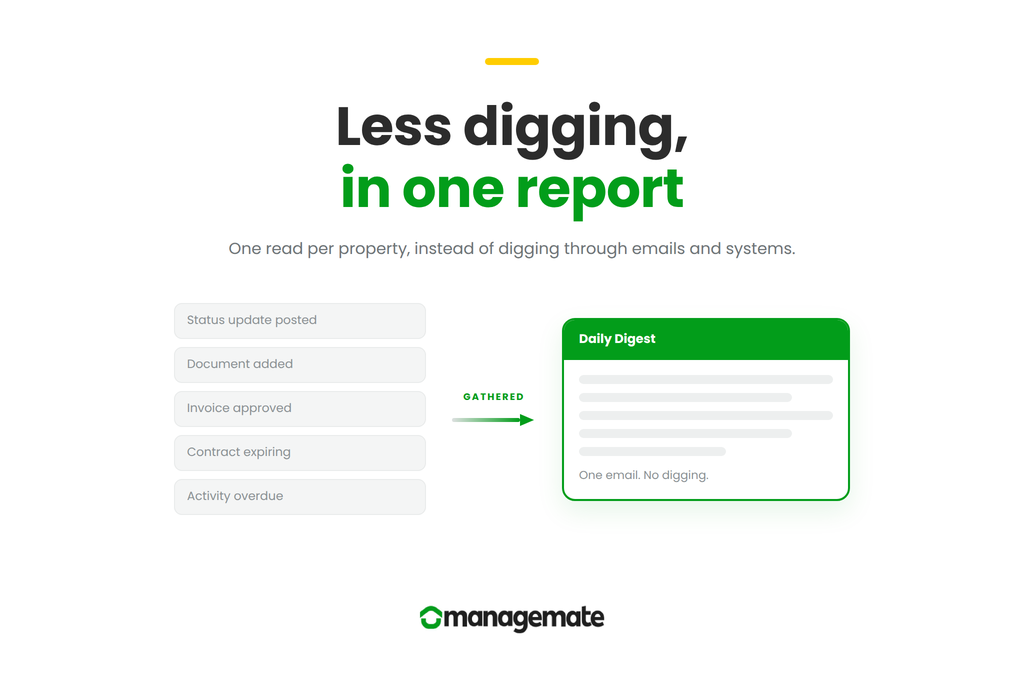
Managemate's scheduled emails have been rebuilt as consolidated reports. What the Daily Agenda, Portfolio Overview, Daily Digest and Weekly Digest each gather, who each is for, and how to choose what you receive.

Salim Dharssi's Profile Picture

Written By Salim Dharssi

September 10, 2026

Condo work rarely falls through because someone stopped caring. Managers and directors are busy. If nothing surfaces pending work, it can fall through the cracks and get left behind.

An action item with no due date, or a task that's been pending for three weeks, can sit quietly in a list somewhere. A contract ends up expiring while everyone is focused on the roof project. A manager writes a thoughtful status update, and the one director who needed to read it missed that email.

We've rebuilt several scheduled emails Managemate sends, and added one that didn't exist before. These four emails answer a different question or are intended for users with different working cadences. Each one is a report rather than an alert. It gathers what happened, or what is coming, into a single read, so you are not digging through emails and systems to piece it together.

Two arrive in the morning and look forward. Two arrive at the end of the day and mostly look back.

  • Daily Agenda Email. Arrives 7:00 AM, one per property, covering today. It answers: what needs to happen here today?
  • Portfolio Overview Email. Arrives 6:45 AM, one email for everything, covering today plus what is outstanding. It answers: across every property I manage, where should I look first?
  • Daily Digest Email. Arrives 5:00 PM, one per property, covering the last 24 hours. It answers: what happened here today?
  • Weekly Digest Email. Arrives Friday 5:00 PM, one per property, covering the last 7 days and the next 7. It answers: what moved this week, and what's coming up?

Every email generates uniquely to accommodate your permissions. Two people in the same condo may receive different emails, because each sees only the records they are allowed to view. And if there is nothing to report, no email is sent. A quiet property should produce a quiet inbox.

The problem nobody was tracking

An overdue activity has always announced itself. It has a due date, and when the due date has passed, Managemate's software will surface it.

An unscheduled activity, on the other hand, doesn't announce itself. Since it has no due date, it's never late. It simply sits in your Workspace, waiting to be acted on and updated.

This gap was flagged for us by the president of a management company we work with. The issue wasn't work that was late, which any system can report, but work that had started aging, which would fall through the cracks. This is also a category of work that produces surprises in board meetings, because the first person to notice is usually a director asking what happened to something from two meetings ago.

So, we taught Managemate how to raise a hand.

Anywhere you look at unscheduled activities in Managemate, each one now tells you how long it has been quiet: 21 days without a status update. Where an update exists, you can read the most recent one from that line. Where none exists, it says so plainly. You can sort the list by time without an update and work from the top.

This appears in the Unscheduled tab of the calendar, in the Upcoming section of the Activities list, and as a count in two of the four emails. It is the same fact, surfaced in each of the places where you would act on it.

Portfolio Overview Email, at 6:45 AM

This one is new, and it exists for a specific person: someone responsible for more than one property.

If you manage fifteen condos, you receive up to fifteen morning reminder emails, all arriving in the same minute. Nobody reads fifteen agendas properly. And the ones that get skimmed are not the ones you would have chosen to skim, because you can't tell which is which until you've opened them.

Portfolio Overview is the email for anyone who carries more than one property: managers and assistant managers, and the regional and operations leaders who oversee them. It is the one to read first. A single email covering every property you have access to in Managemate, with no item detail at all. Just counts, grouped by property:

  • Due today: activities, projects, invoices, contracts expiring
  • Starting today: activities, projects, contracts renewing
  • Overdue: activities, projects, invoices
  • Needs update: unscheduled activities quiet for 14 days or more, and active contracts already expired

Counts of zero are hidden. Properties with nothing outstanding are left out of the email entirely. So, the length of the email tells you how your morning looks before you've read a word of it.

Two properties need you today. Twelve don't. You know which is which in about a minute, and the agendas for the twelve become a reference you can consult rather than a queue you have to clear.

Each email contains links straight through to the property's Managemate Workspace, and the subject line carries the total, so you can triage from a notification on your phone before you've opened anything.

If you're responsible for several properties, this is the email to read first. Read it, open the two or three properties that need you, and let the rest wait. If you decide later that you no longer need the individual daily agendas at all, they can be turned off in your notification settings.

Portfolio Overview appears in your notification settings only if you have access to more than one property, under Reminders. We've switched it on for the managers and assistant managers who oversee several condos. If you look after several and it is not arriving, you can turn it on there yourself, or write to us and we will do it for you.

If you look after a single condo, this portfolio overview isn't for you, and it won't appear in your settings. Your Daily Agenda covers the same ground for that property in more detail.

Daily Agenda Email, at 7:00 AM

This is the morning reminder email you already receive, rebuilt and renamed.

It covers one property and one day. Activities and projects starting or due today, invoices due today, and contracts expiring or renewing today. Each item now carries the context you need to judge it without opening anything: the type of record, who it is assigned to, its tags, and its current status. Items that are due at a particular time say so.

Two sections in the email are new: Activities and projects that are starting today now appear alongside the ones that are due, because a project that begins today deserves the same attention as one that ends today.

And at the bottom of the email there is now a short block of counts, headed "Some items that need your attention:" these are overdue activities and projects, and active contracts that have already expired. We also include unscheduled activities that have gone 14 days or more without a status update.

If you look after one or two properties, this is probably the morning email you want. If you look after a dozen, read the Portfolio Overview section above, which should point you to the Daily Agendas you want to pay closer attention to.

Daily Digest Email, at 5:00 PM

The end of the day email, now built on the same design as our recently redesigned Weekly Digest Email.

The daily digest email covers the last 24 hours at one property, and it is the most complete of the four. Activities are grouped into To Do, Overdue and Completed. New projects are listed, as well as new vendors added to the Workspace. Invoices also appear, with their amount and approval status (if you're using our invoice approval system, as some of our self managed condos or others do). We display new documents of every type, grouped as General Documents, Financial Statements and Certificates, each showing how many activities it is linked to.

New notes and status updates now appear directly beneath the record they belong to, with the author, the time, and enough of the text to know whether you need to read the rest. A link takes you to the full update, and where more than one was written that day, a count tells you how many others are waiting.

This is the email that replaces the practice of writing a summary of the day to colleagues, or asking for one.

Weekly Digest Email, on Fridays at 5:00 PM

The Weekly Digest was the first of the four to be rebuilt, and it went out in its new form recently. If you noticed your Friday email looked different, this is why.

The most useful change is structural. Status updates used to appear in their own section, separately from the activities they described, which meant the same work was often reported twice in one email. Now each update sits under its activity, attributed and timestamped. The duplication is gone and the email is shorter for it.

A NEW badge marks anything created in the last seven days, so you can see at a glance what is genuinely new rather than simply still open. A Reminders section collects contracts that expired or renewed during the week, and overdue projects. And the week ahead is laid out by day, with a badge on each item saying whether it starts, is due, ends, expires or renews.

For most board directors, this is the only Managemate email they need.

Choosing what email notifications you receive

All four of the email notifications mentioned in this article are controlled in one place: your notification settings, reached from your profile icon, then View Profile, then the Notifications tab. Digests and Reminders are separate sections there.

One thing to know before you change anything: your choices apply across every Workspace you have access to. You cannot receive the Daily Agenda for three properties and not the rest.

Managers generally want the Daily Digest Email turned on. Their work changes hour to hour, and a week is too long to wait to learn that something went sideways on Tuesday.

Board directors are usually well served by having the Weekly Digest Email turned on, instead of the Daily Digest Email. Some of the more hands-on directors prefer the Daily Digest Email though because the daily email carries most of the same detail at a closer interval. Either choice is reasonable. Receiving both is also fine, and many people do.

Managemate sends other notification emails as well, for mentions and assignee changes among others. Those are unchanged, and they sit on the same settings page.

If the volume is not right, our guide on getting the right amount of notifications walks through the tradeoffs for each type.

And if any of these emails are not landing the way you expect, please write to us at support@managemate.app. Feedback from managers and directors has shaped every version of these so far.

For management companies

If you run a portfolio, the question worth asking is not whether your managers are working hard. It is whether your reporting can distinguish between three different things: work that is progressing, work that is late, and work that has quietly gone silent.

Most systems handle the first two. The third is where the surprises come from, and it is usually discovered in a board meeting rather than in a report.

We would be glad to show you how this works across a portfolio like yours. You can book a short call at a time that suits you.

Request a Demo

September 10, 2026

Condo work rarely falls through because someone stopped caring. Managers and directors are busy. If nothing surfaces pending work, it can fall through the cracks and get left behind.

An action item with no due date, or a task that's been pending for three weeks, can sit quietly in a list somewhere. A contract ends up expiring while everyone is focused on the roof project. A manager writes a thoughtful status update, and the one director who needed to read it missed that email.

We've rebuilt several scheduled emails Managemate sends, and added one that didn't exist before. These four emails answer a different question or are intended for users with different working cadences. Each one is a report rather than an alert. It gathers what happened, or what is coming, into a single read, so you are not digging through emails and systems to piece it together.

Two arrive in the morning and look forward. Two arrive at the end of the day and mostly look back.

  • Daily Agenda Email. Arrives 7:00 AM, one per property, covering today. It answers: what needs to happen here today?
  • Portfolio Overview Email. Arrives 6:45 AM, one email for everything, covering today plus what is outstanding. It answers: across every property I manage, where should I look first?
  • Daily Digest Email. Arrives 5:00 PM, one per property, covering the last 24 hours. It answers: what happened here today?
  • Weekly Digest Email. Arrives Friday 5:00 PM, one per property, covering the last 7 days and the next 7. It answers: what moved this week, and what's coming up?

Every email generates uniquely to accommodate your permissions. Two people in the same condo may receive different emails, because each sees only the records they are allowed to view. And if there is nothing to report, no email is sent. A quiet property should produce a quiet inbox.

The problem nobody was tracking

An overdue activity has always announced itself. It has a due date, and when the due date has passed, Managemate's software will surface it.

An unscheduled activity, on the other hand, doesn't announce itself. Since it has no due date, it's never late. It simply sits in your Workspace, waiting to be acted on and updated.

This gap was flagged for us by the president of a management company we work with. The issue wasn't work that was late, which any system can report, but work that had started aging, which would fall through the cracks. This is also a category of work that produces surprises in board meetings, because the first person to notice is usually a director asking what happened to something from two meetings ago.

So, we taught Managemate how to raise a hand.

Anywhere you look at unscheduled activities in Managemate, each one now tells you how long it has been quiet: 21 days without a status update. Where an update exists, you can read the most recent one from that line. Where none exists, it says so plainly. You can sort the list by time without an update and work from the top.

This appears in the Unscheduled tab of the calendar, in the Upcoming section of the Activities list, and as a count in two of the four emails. It is the same fact, surfaced in each of the places where you would act on it.

Portfolio Overview Email, at 6:45 AM

This one is new, and it exists for a specific person: someone responsible for more than one property.

If you manage fifteen condos, you receive up to fifteen morning reminder emails, all arriving in the same minute. Nobody reads fifteen agendas properly. And the ones that get skimmed are not the ones you would have chosen to skim, because you can't tell which is which until you've opened them.

Portfolio Overview is the email for anyone who carries more than one property: managers and assistant managers, and the regional and operations leaders who oversee them. It is the one to read first. A single email covering every property you have access to in Managemate, with no item detail at all. Just counts, grouped by property:

  • Due today: activities, projects, invoices, contracts expiring
  • Starting today: activities, projects, contracts renewing
  • Overdue: activities, projects, invoices
  • Needs update: unscheduled activities quiet for 14 days or more, and active contracts already expired

Counts of zero are hidden. Properties with nothing outstanding are left out of the email entirely. So, the length of the email tells you how your morning looks before you've read a word of it.

Two properties need you today. Twelve don't. You know which is which in about a minute, and the agendas for the twelve become a reference you can consult rather than a queue you have to clear.

Each email contains links straight through to the property's Managemate Workspace, and the subject line carries the total, so you can triage from a notification on your phone before you've opened anything.

If you're responsible for several properties, this is the email to read first. Read it, open the two or three properties that need you, and let the rest wait. If you decide later that you no longer need the individual daily agendas at all, they can be turned off in your notification settings.

Portfolio Overview appears in your notification settings only if you have access to more than one property, under Reminders. We've switched it on for the managers and assistant managers who oversee several condos. If you look after several and it is not arriving, you can turn it on there yourself, or write to us and we will do it for you.

If you look after a single condo, this portfolio overview isn't for you, and it won't appear in your settings. Your Daily Agenda covers the same ground for that property in more detail.

Daily Agenda Email, at 7:00 AM

This is the morning reminder email you already receive, rebuilt and renamed.

It covers one property and one day. Activities and projects starting or due today, invoices due today, and contracts expiring or renewing today. Each item now carries the context you need to judge it without opening anything: the type of record, who it is assigned to, its tags, and its current status. Items that are due at a particular time say so.

Two sections in the email are new: Activities and projects that are starting today now appear alongside the ones that are due, because a project that begins today deserves the same attention as one that ends today.

And at the bottom of the email there is now a short block of counts, headed "Some items that need your attention:" these are overdue activities and projects, and active contracts that have already expired. We also include unscheduled activities that have gone 14 days or more without a status update.

If you look after one or two properties, this is probably the morning email you want. If you look after a dozen, read the Portfolio Overview section above, which should point you to the Daily Agendas you want to pay closer attention to.

Daily Digest Email, at 5:00 PM

The end of the day email, now built on the same design as our recently redesigned Weekly Digest Email.

The daily digest email covers the last 24 hours at one property, and it is the most complete of the four. Activities are grouped into To Do, Overdue and Completed. New projects are listed, as well as new vendors added to the Workspace. Invoices also appear, with their amount and approval status (if you're using our invoice approval system, as some of our self managed condos or others do). We display new documents of every type, grouped as General Documents, Financial Statements and Certificates, each showing how many activities it is linked to.

New notes and status updates now appear directly beneath the record they belong to, with the author, the time, and enough of the text to know whether you need to read the rest. A link takes you to the full update, and where more than one was written that day, a count tells you how many others are waiting.

This is the email that replaces the practice of writing a summary of the day to colleagues, or asking for one.

Weekly Digest Email, on Fridays at 5:00 PM

The Weekly Digest was the first of the four to be rebuilt, and it went out in its new form recently. If you noticed your Friday email looked different, this is why.

The most useful change is structural. Status updates used to appear in their own section, separately from the activities they described, which meant the same work was often reported twice in one email. Now each update sits under its activity, attributed and timestamped. The duplication is gone and the email is shorter for it.

A NEW badge marks anything created in the last seven days, so you can see at a glance what is genuinely new rather than simply still open. A Reminders section collects contracts that expired or renewed during the week, and overdue projects. And the week ahead is laid out by day, with a badge on each item saying whether it starts, is due, ends, expires or renews.

For most board directors, this is the only Managemate email they need.

Choosing what email notifications you receive

All four of the email notifications mentioned in this article are controlled in one place: your notification settings, reached from your profile icon, then View Profile, then the Notifications tab. Digests and Reminders are separate sections there.

One thing to know before you change anything: your choices apply across every Workspace you have access to. You cannot receive the Daily Agenda for three properties and not the rest.

Managers generally want the Daily Digest Email turned on. Their work changes hour to hour, and a week is too long to wait to learn that something went sideways on Tuesday.

Board directors are usually well served by having the Weekly Digest Email turned on, instead of the Daily Digest Email. Some of the more hands-on directors prefer the Daily Digest Email though because the daily email carries most of the same detail at a closer interval. Either choice is reasonable. Receiving both is also fine, and many people do.

Managemate sends other notification emails as well, for mentions and assignee changes among others. Those are unchanged, and they sit on the same settings page.

If the volume is not right, our guide on getting the right amount of notifications walks through the tradeoffs for each type.

And if any of these emails are not landing the way you expect, please write to us at support@managemate.app. Feedback from managers and directors has shaped every version of these so far.

For management companies

If you run a portfolio, the question worth asking is not whether your managers are working hard. It is whether your reporting can distinguish between three different things: work that is progressing, work that is late, and work that has quietly gone silent.

Most systems handle the first two. The third is where the surprises come from, and it is usually discovered in a board meeting rather than in a report.

We would be glad to show you how this works across a portfolio like yours. You can book a short call at a time that suits you.

Request a Demo

Fully functional. No credit card.

Get organized. Control costs. Make informed decisions.